Synology DiskStation DS225+ 2-Bay NAS Review
Centralized network storage for household backups, private-cloud access, photos, files and consumers ready to move beyond a single USB backup drive.
What It Is
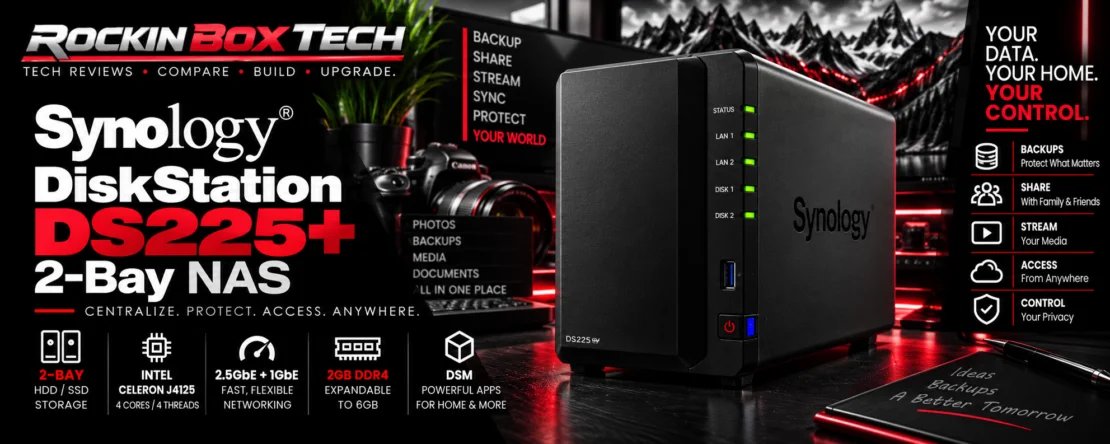
The Synology DiskStation DS225+ is a compact two-bay network-attached storage system designed to centralize files, backups and private data for a home, home office or small working environment.
Unlike a conventional external hard drive that connects directly to one computer, the DS225+ connects to the network. Compatible computers, phones and other devices can then access the NAS through Synology's DiskStation Manager software ecosystem.
It ships without storage drives, so the final capacity and storage configuration depend on the compatible SATA HDDs or SSDs installed by the owner.
Key Specifications
| Model | Synology DiskStation DS225+ |
|---|---|
| Drive Bays | 2 |
| Supported Drive Types | 3.5-inch SATA HDD / 2.5-inch SATA SSD |
| Hot Swappable | Yes |
| Processor | Intel Celeron J4125 — 4 cores / 4 threads |
| CPU Frequency | 2.0 GHz base / 2.7 GHz turbo |
| Memory | 2GB DDR4 non-ECC |
| Maximum Memory | 6GB total — 2GB + optional 4GB module |
| Networking | 1 × 2.5GbE RJ-45 + 1 × 1GbE RJ-45 |
| USB | 2 × USB 3.2 Gen 1 |
| Dimensions | 165 × 108 × 232.2 mm |
| Weight | 1.3 kg without installed drives |
| Rated Noise Level | 19.6 dB(A) under Synology's specified test conditions |
| Warranty | 3-year hardware warranty; extension options vary by region |
Why Consumers Move to a NAS
One Home for Your Files
Instead of scattering photos, documents and backups across individual computers and portable drives, a NAS provides one centralized storage location accessible across the network.
Automatic Backups
Synology's software ecosystem can support scheduled and automated backup workflows rather than depending entirely on someone remembering to connect a USB drive.
Private-Cloud Approach
Consumers can keep substantial amounts of personal data on hardware they control while still accessing supported files from computers and mobile devices.
Two Drive Bays
Two bays allow storage configurations that can prioritize capacity or provide drive redundancy, depending on the chosen RAID or Synology Hybrid RAID setup.
Multi-Gig Networking
The addition of a 2.5GbE connection gives the DS225+ more network bandwidth than a conventional Gigabit-only NAS when the rest of the network also supports 2.5GbE.
Expandable Functionality
DiskStation Manager turns the enclosure into more than simple file storage, with Synology applications covering backup, synchronization, photos, sharing and other server functions.
What Owners Are Saying
The DS225+ is still a relatively new model, so its exact-model consumer review pool is much smaller than the thousands of reviews available for long-established portable drives. That means the early feedback is useful, but it should not be mistaken for long-term reliability evidence.
Setup Gets Positive Feedback
Early verified owners repeatedly describe the physical setup and initial installation as straightforward, particularly for users who are willing to spend some time learning DSM.
Apple & PC Integration
Current owner feedback specifically mentions successful use across Apple and Windows devices, an important advantage for mixed-device households.
Phone Access
Owners highlight being able to reach their stored data from a phone, helping the DS225+ function more like a personal cloud than a traditional external hard drive.
Photo Storage
Household photo storage and backup are recurring real-world use cases, including users who want more control over their personal libraries.
DSM Is a Major Attraction
Both owner comments and independent technical coverage point to Synology's software environment as one of the platform's major strengths.
There Is a Learning Curve
A NAS requires more configuration than plugging in an external USB drive. One household owner specifically noted that learning and configuring the system takes some time for a first-time NAS user.
What Independent Testing Found
2.5GbE Makes a Difference
Independent testing found the new 2.5GbE interface to be the DS225+'s most important hardware improvement over the DS224+, allowing substantially higher network throughput on compatible multi-gig networks.
Cool & Quiet Operation
Independent hands-on testing reported quiet fan behavior and cool operation during testing, supporting the DS225+'s appeal for home and office environments.
Hardware Is Still Modest
The Intel Celeron J4125 and 2GB starting memory are capable for normal NAS duties, but this is not a high-end server platform. More demanding workloads can expose those hardware limits.
What People Are Actually Using It For
Family Photo Libraries
Consumers are using Synology systems to centralize family photographs and make those libraries available from computers and mobile devices.
Computer Backups
Household owners report using the DS225+ to protect laptop and desktop data rather than maintaining a separate USB backup drive for every machine.
Private Cloud Storage
Some buyers specifically choose the NAS to reduce dependence on recurring cloud-storage subscriptions while maintaining remote access to their own data.
Shared Household Files
Multiple users and devices can work from the same centralized storage pool instead of maintaining duplicate files on several computers.
Media Storage
The DS225+ can serve network-accessible video, music and other media libraries, although specific playback and transcoding requirements should be evaluated separately.
Small Office Storage
Centralized file sharing, synchronization and backup also make the compact two-bay design relevant to home offices and small teams.
NAS vs External USB Drive
Why Choose the DS225+?
- Centralized storage for multiple devices
- Automated network backup options
- 2.5GbE networking
- Private-cloud-style file access
- Two drive bays with redundancy options
- Synology DSM software ecosystem
- Phone, computer and network access
- Much broader functionality than a USB drive
Why Choose an External Drive Instead?
- Much simpler initial setup
- Lower total purchase cost
- No network administration required
- Easy to disconnect for offline backup
- Portable models can travel with the user
- No separate NAS enclosure and drive purchases
Strengths & Limitations
Strengths
- Two hot-swappable SATA drive bays
- 2.5GbE plus 1GbE networking
- Well-developed DSM software ecosystem
- Centralized multi-device backup
- Private-cloud and remote-access potential
- 2GB memory expandable to 6GB
- Compact enclosure
- 3-year hardware warranty
Limitations
- Storage drives are purchased separately
- More expensive than a basic external HDD
- Requires initial NAS and network configuration
- 2GB standard memory is modest
- Maximum supported memory is only 6GB
- No 10GbE upgrade path
- Only two internal drive bays
- Exact-model long-term owner data is still limited
Works Best With
Families With Multiple Devices
A strong fit when several computers and phones need access to one centralized backup and storage location.
Photo & Document Archives
Well suited to consumers who want personal photos, documents and other important files stored on hardware they control.
Home & Small Offices
Network file sharing, synchronization and automated backups make the DS225+ considerably more versatile than a conventional direct-attached backup drive.
RAID Is Not a Backup
Rockin Box Tech Summary
The Synology DiskStation DS225+ represents a major step beyond the portable and desktop USB drives elsewhere in this category. Instead of simply adding storage to one computer, it creates a centralized storage platform that can serve multiple computers, phones and users.
Its strongest combination is Synology's mature DSM environment, two-drive architecture and the addition of 2.5GbE networking. Independent testing confirms that the faster network connection produces a meaningful performance improvement over previous Gigabit-only two-bay models.
Early consumer feedback is also encouraging, particularly around setup, Apple and PC integration, mobile access and household backup. The important caution is that the DS225+ is still new enough that exact-model owner samples remain small, so those positive reports should not be overstated as long-term reliability evidence.
For a consumer who simply wants to plug in a drive and copy files, an external HDD remains easier and cheaper. For households that want automated backups, centralized files and a private storage platform accessible across multiple devices, the DS225+ offers a much broader solution.
Research Disclosure: Rockin Box Tech reviews are research-driven. Information is compiled from manufacturer specifications, technical documentation, reputable independent testing and owner/customer feedback. Rockin Box Tech does not represent that this product was physically tested unless explicitly stated. Specifications, software support, compatibility information and customer ratings may change over time.