
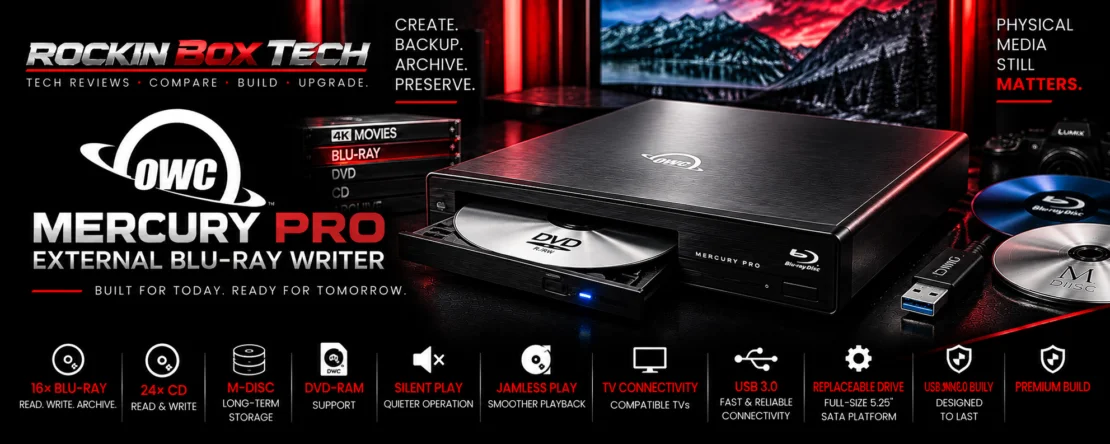
OWC Mercury Pro 16× External Blu-ray Writer Review
A full-size external optical workstation combining 16× Blu-ray recording, DVD and CD support, M-DISC archiving and a premium desktop enclosure built for Mac and PC workflows.
What It Is
The OWC Mercury Pro is a full-size external optical-drive platform designed for users who want desktop-class optical hardware without installing a 5.25-inch drive inside their computer.
OWC currently offers the Mercury Pro in three configurations: a 24× DVD/CD burner, a 16× Blu-ray burner, and an enclosure-only version that allows the owner to install a compatible 5.25-inch SATA optical drive.
This review focuses on the current 16× Blu-ray configuration. It supports Blu-ray, DVD and CD media, high-capacity optical storage up to 100GB, M-DISC and USB 3 connectivity.
Key Specifications
| Product | OWC Mercury Pro External Optical Drive |
|---|---|
| Configuration Reviewed | 16× Blu-ray burner / reader |
| Optical Media | Blu-ray / DVD / CD |
| Maximum Blu-ray Rating | Up to 16× |
| Maximum Optical Capacity | Up to 100GB on compatible Blu-ray media |
| M-DISC | Supported |
| Host Interface | USB 3 |
| Interface Bandwidth | Up to 5Gb/s on current USB 3.2 Gen 1 product listings |
| Computer Compatibility | Mac and PC |
| Power | External power supply |
| Drive Format | Full-size 5.25-inch SATA optical-drive platform |
| Enclosure-Only Option | Available for compatible user-supplied optical drives |
| Included Cable | 0.6-meter USB 3.0 cable |
| Warranty | 1-year OWC Limited Warranty |
The Internal Drive Question
This is one area where it is important not to turn community observations into an official specification.
Recent buyers report receiving LG-based Blu-ray mechanisms inside Mercury Pro units, and at least one 2026 buyer identified the installed mechanism in his unit as a BH16NS40. Other Mercury Pro owners have reported different LG mechanisms over the product's long lifespan.
Why the Full-Size Design Matters
Desktop-Class Mechanism
The Mercury Pro uses a conventional full-size optical-drive format rather than an ultra-thin notebook-style mechanism.
16× Blu-ray
The current Blu-ray configuration is rated at up to 16×, substantially above the headline 6× speeds of many portable Blu-ray writers.
External Power
A dedicated power supply means the optical mechanism does not have to rely on the computer's USB port for its operating power.
Replaceable Platform
OWC also sells the enclosure separately, making the Mercury Pro concept more flexible than a permanently sealed portable optical drive.
Mac + PC
OWC explicitly markets the platform for both Mac and PC workflows.
Archive Focus
M-DISC and high-capacity Blu-ray support make physical archiving one of the product's primary intended uses.
What Owners Are Saying
The Mercury Pro has substantially more accumulated owner feedback than several of the exact-model optical drives already examined in this category.
OWC's current review pool across Mercury Pro configurations reports approximately 4.67 out of 5, with 167 of 188 reviewers indicating they would recommend the product.
Solid Enclosure
Recent verified purchasers describe the enclosure as solid, and community discussions repeatedly praise the substantial construction compared with inexpensive slim external drives.
Easy Installation
Owners of the enclosure-only configuration report straightforward installation of compatible full-size optical mechanisms.
Reliable Everyday Use
Current feedback includes owners reporting successful DVD, Blu-ray and general optical-media use without complicated installation.
Noise Can Be Noticeable
At least one recent verified owner specifically describes the drive as noisier than expected while reading discs, despite otherwise positive operation.
Quality Feel Gets Praise
Recent community feedback describes the Mercury Pro as feeling substantially built and more like traditional desktop optical hardware than a lightweight portable accessory.
Mechanism Can Vary
Owners trying to purchase a particular internal optical mechanism should not assume every preconfigured Mercury Pro contains exactly the same drive model.
What Current Enthusiasts Are Saying
The Mercury Pro remains unusually visible in optical-media enthusiast communities in 2026, particularly among people who prefer a full-size drive over today's inexpensive portable mechanisms.
Full-Size Drive Preference
Current users specifically mention choosing the Mercury Pro because they prefer a conventional internal-style mechanism inside an external enclosure rather than a slim portable drive.
Build Quality
Recent owner discussion describes the enclosure as high quality and substantial, reinforcing the same theme found in OWC's verified-purchase feedback.
Enclosure Flexibility
Some enthusiasts buy the enclosure specifically so an existing full-size SATA optical drive can continue to be used with a modern computer that lacks a 5.25-inch drive bay.
What People Are Actually Using It For
Blu-ray Creation
The 16× configuration provides a desktop-class option for creating compatible Blu-ray media.
Personal Media Libraries
Owners use Mercury Pro configurations to access personally owned Blu-ray, DVD and CD collections on modern computers.
M-DISC Archives
M-DISC support is a major part of OWC's own positioning for long-term physical-media storage.
Large Optical Projects
Compatible Blu-ray media provides project capacity up to 100GB, reducing the number of discs required compared with conventional DVD media.
Repurposing Existing Drives
The enclosure-only configuration gives owners a way to reuse compatible 5.25-inch SATA optical drives after moving to a computer case without optical bays.
Desktop Optical Workstations
Its size and dedicated power supply make more sense for a permanent workstation than for frequent travel.
M-DISC & Physical Archiving
OWC places unusually strong emphasis on M-DISC in its current Mercury Pro marketing. Compatible M-DISC media is designed as a write-once archival format rather than conventional rewritable everyday storage.
OWC Mercury Pro vs Pioneer BDR-X13U-S
OWC Mercury Pro
The major advantage in 2026 is that OWC still actively offers the Mercury Pro platform, including a 16× Blu-ray configuration and an enclosure-only option. Its design also allows compatible full-size mechanisms to be installed or replaced.
Pioneer BDR-X13U-S
Pioneer supplied a more tightly integrated optical product with features such as PureRead 4+, but current retail availability has become a significant problem as the exact model disappears from major retailers.
OWC Mercury Pro vs Slim Portable Drives
Mercury Pro
Larger, externally powered and intended primarily for desktop use, but built around a full-size optical mechanism.
Slim Drives
Models such as the Pioneer BDR-XD08B, Verbatim 43888 and ASUS SBW-06D5H-U are much easier to carry and generally operate from USB power.
The Decision
Consumers prioritizing portability will usually prefer a slim writer. Users prioritizing a substantial desktop optical workstation may find the Mercury Pro approach more appealing.
Blu-ray & 4K UHD Reality Check
The current Mercury Pro 16× configuration is officially marketed as a Blu-ray, DVD and CD recording solution. OWC's current standard product page does not make specialized firmware modification a standard feature of the drive.
Strengths & Limitations
Strengths
- Current 16× Blu-ray configuration
- Reads and writes Blu-ray, DVD and CD media
- Supports optical projects up to 100GB
- M-DISC support
- USB 3 connectivity
- Mac and PC compatibility
- Full-size optical-drive platform
- Dedicated external power supply
- Enclosure-only configuration available
- Replaceable compatible 5.25-inch SATA mechanism
- Strong accumulated platform-owner feedback
- 1-year OWC limited warranty
Limitations
- Much larger than portable slim optical drives
- Requires external AC power
- Not ideal for frequent travel
- Current included mechanism is not guaranteed as one exact LG model
- Some owner feedback reports noticeable drive noise
- USB cable is Type-A based; USB-C-only Macs may require an adapter
- Family-wide review totals mix multiple Mercury Pro configurations
- Unofficial UHD firmware features depend on exact mechanism and firmware
Works Best With
Desktop Media Workstations
The Mercury Pro makes the most sense when it can remain connected to a workstation instead of being carried between locations every day.
Physical Media Collections
Blu-ray, DVD and CD support gives one full-size external drive access to several generations of optical media.
Long-Term Archive Systems
Blu-ray and M-DISC can complement SSD, HDD, NAS and cloud storage with removable offline copies.
Optical Media Is One Backup Layer
Rockin Box Tech Summary
The OWC Mercury Pro stands out in 2026 because it preserves the traditional full-size optical-drive approach at a time when most computers no longer provide an internal 5.25-inch drive bay.
The current 16× Blu-ray configuration supports Blu-ray, DVD and CD media, optical projects up to 100GB and M-DISC while connecting externally through USB 3. That makes it a fundamentally different proposition from the slim 6× portable writers in this review category.
Consumer feedback is another strength. OWC's broader Mercury Pro review pool is large for a modern optical product and remains strongly positive overall. Owners repeatedly value the substantial enclosure and straightforward operation, although drive noise and the system's much larger physical footprint are legitimate tradeoffs.
The replaceable-drive concept is especially valuable. OWC sells the enclosure separately, allowing a compatible full-size SATA optical mechanism to be installed instead of forcing the entire external unit to remain tied permanently to one mechanism.
We would not, however, buy the preconfigured version on the assumption that it contains one guaranteed LG model. Current owners report LG mechanisms, but the exact mechanism and firmware should be checked on the actual unit whenever that detail matters.
For consumers who want a substantial desktop Blu-ray workstation rather than the smallest possible portable drive, the Mercury Pro remains one of the more interesting currently available approaches to keeping full-size optical media alive on modern computers.
Research Disclosure: Rockin Box Tech reviews are research-driven. Information is compiled from current manufacturer specifications, product documentation, verified-purchase feedback and relevant owner/community discussion. Rockin Box Tech does not represent that this product was physically tested unless explicitly stated. Owner reports about installed mechanisms and firmware are kept separate from OWC's guaranteed specifications. Availability, internal mechanisms, firmware, compatibility and consumer feedback may change over time.